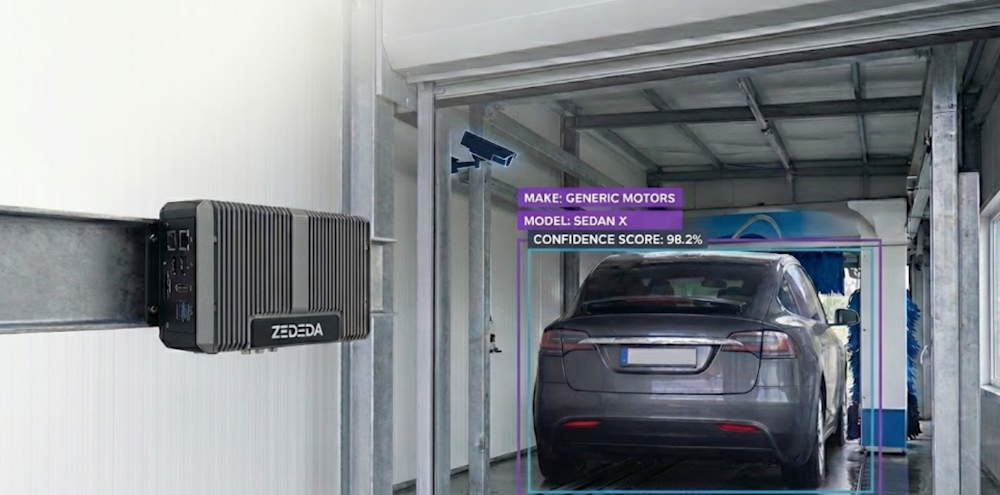

Cloud computing, with its virtually unlimited set of resources, leads people to expect a lot from AI. In a big data center, the most important part of “performance” is how accurate the AI is; speed matters less. If a computer vision model or large language model is slow, people just add more GPUs. In the context of cloud computing, issues such as heat dissipation and power consumption are the building manager’s responsibility and are billed as additional costs.
As AI workloads move to the edge, such as factory floors, remote wind farms, and retail ceilings, the operational requirements fundamentally shift. In place of infinitely elastic compute, we have a relatively small, fixed amount of compute on an edge device. Instead of ample cooling, we have fanless devices that sometimes need to throttle their processor cycles to avoid overheating.
In this post, we’ll explain how success for edge AI applications, whether a computer vision safety camera on a production line or a GenAI smart assistant on a kiosk, is profoundly shaped by the constraints of the physical world, in a way that cloud AI is not. Successful edge AI requires decisions at the intersection of economics, electronics, and mathematics, three fields that are usually not considered together, but must be in this context.
CAPEX vs. OPEX components in edge AI
The first hurdle for edge AI is its economics, which are restrictive across model types.
For edge computing, capital expenditure (CAPEX) for your initial hardware investment is much less flexible than with cloud computing. You have to buy the physical equipment (edge devices) upfront, rather than rent them by the hour. This approach means you have to make the correct hardware purchase decisions. For example, if you buy powerful hardware to overcome inefficient AI models, you immediately decrease your Return on Investment (ROI). To make your models more efficient, you need to use techniques such as pruning, knowledge distillation, quantization, low-rank factorization, layer fusion, and early exit.
Operational Expenditure (OPEX), the ongoing cost of running edge AI, includes more than just software fees; it’s the everyday expense of keeping things running in the field:
- Network Bandwidth: When deciding on a model, consider the cost and availability of network bandwidth. Sending constant, high-volume data (such as video frames) over costly links (LTE, 5G, or satellite networks like Starlink) to the cloud is often unsustainable. If a model can process data locally at the edge, it significantly reduces bandwidth requirements and operational costs.
- Power usage: Every small amount of electricity used adds up. Running a vision model constantly on thousands of cameras can cause electricity bills to skyrocket.
- Remote service. Truck rolls to update models and software components, respond to incidents such as remote devices that are not working due to software or hardware failures, and upgrade devices as new vulnerabilities surface.
- Heat: In many industrial settings, fans cannot be used to cool the device. The devices must be fanless to prevent dust ingress, so the metal casing must cool the device. Data centers use large HVACs to keep computers cool. At the edge, the weather and location may make things hard.
Because of this, how well different AI models work is very important.
- Computer Vision: Many edge systems now use cameras to detect objects or continuously check product quality. If these computing models make the device too hot, the device slows down. For example, a safety video that should play smoothly at 30 frames per second (FPS) might slow to a choppy 5 FPS, which could cause it to miss important safety issues.
- GenAI: Generative models demand a lot of computer power all at once. They fully utilize the CPU, GPU, and memory simultaneously. They cause huge, sudden heat increases, which can make a device shut down before it finishes its task.
What makes a good model in edge AI?
Because of these physical constraints, we need to redefine what constitutes a “good” model. It is no longer enough to look at a Confusion Matrix or an F1 Score. A successful edge AI solution demands a balance between competing forces specific to the workload. Let’s examine some specific cases.
What’s Important for AI that Sees (Computer Vision)
For most AI running on devices, it needs to work the same way all the time. A good seeing AI model needs to balance the following goals, which can be in opposition with each other:
Being Correct
Does it correctly find the problem or object? How does it perform in terms of Precision and Recall in balancing the trade-off between missing valid instances and flagging incorrect ones? If you need spatial localization, how does it perform in terms of Intersection over Union (IoU) for bounding box alignment and Mean Average Precision (mAP)? How does the model’s behavior align with your application’s tolerance for False Positives vs. False Negatives?.
Speed
Can it process images quickly enough to keep up with a factory line? If your use case requires processing video rather than still images, you need to consider the model’s performance in terms of frames per second (FPS). An AI model needs to be fast enough to analyze video frames as they are received. Note that some models might be highly accurate but too slow to process video frames as they arrive, which may prompt you to consider workarounds such as faster hardware, model optimizations, or a different model entirely.
Consistency
Does the AI always respond quickly and not suddenly slow down? While AI models are deterministic, the hardware environment at the edge introduces considerable variance. Factors like thermal throttling and background OS tasks competing for memory bandwidth can cause unpredictable lag spikes.
This unpredictability is why looking at the average speed (P50) can be misleading. You must measure the worst-case response times, the 99th percentile or P99, to ensure the device responds reliably, even when it is hot or busy.
Heat Control
Can the edge device that your model runs on operate for a full day (24 hours) without overheating? This factor is especially important given that edge deployments often have limited cooling infrastructure available. For instance, edge devices deployed outdoors often don’t have fans, which can jam up over time. This lack of cooling stands in contrast to systems in a typical data center, which have active cooling infrastructure, ranging from basic capabilities like fans to advanced technologies such as liquid cooling.
What’s New: AI that Creates (Generative AI)
For new AI that creates things (like text), we focus on what the user experiences:
- Time-to-First-Token (TTFT): How long until the user sees the very first word?
- Words Per Second (TPS): Is the text written smoothly without pauses?
- Power Efficiency: Does a simple query cause a massive spike in power consumption?
Effective edge AI implementation requires close collaboration across teams. AI experts must consider not only model accuracy but also alignment with the hardware’s physical constraints.
Here is a guide to help you evaluate and select the right Generative AI model for your architecture.
Check Functional Capability with Standard Benchmarks
When considering whether a model is smart enough for your needs, look to standardized benchmarks such as MMLU for general reasoning or HumanEval for coding tasks. For complex applications that require strong logic, you should stick to models that score above 80% on MMLU, but remember that smaller models scoring in the 60-70% range are often perfect for simpler jobs like summarization or classification. It is also really important to validate these scores against your own Golden Dataset using metrics such as Exact Match or F1 to ensure the model handles your specific data correctly.
Set a Latency Budget Using TTFT and TPS
To keep your users happy, you will need to define a strict latency budget based on Time to First Token (TTFT) for initial responsiveness and Tokens Per Second (TPS) for overall speed. For a real-time chat interface, we generally recommend aiming for a TTFT under 200 ms and a generation speed of at least 30 tokens/second so the text appears as fast as someone can read it. If a model is too slow, consider quantization, which reduces the model’s precision to 4-bit or 8-bit formats and can often boost throughput by 2x to 4x without degrading output quality.
Calculate the Total Cost of Ownership (TCO)
Cost is always a major factor, so you need to weigh the price of Proprietary APIs, which usually run between $5 and $30 per 1 million input tokens for top-tier models, against the fixed infrastructure costs of self-hosting. If your application scales up to process more than 1 billion tokens per month, switching to self-hosted models like Llama 3 on private GPU clusters can often cut your bills by 50% to 80%. On the other hand, sticking with pay-per-token APIs is usually the smarter financial move for lower-volume or spiky workloads since you won’t pay for idle servers.
Verify Context Window Reliability
Just because a model claims a huge Context Window doesn’t mean it remembers everything perfectly, so you should test it with the Needle In A Haystack (NIAH) method to measure recall. You are looking for models that maintain over 99% retrieval accuracy across the full length of the prompt, because many models actually start forgetting things in the middle of long documents. To be safe and avoid Hallucinations in your RAG systems, try to design your prompts to use only 70% to 80% of the maximum capacity.
How ZEDEDA Bridges the Gap
At ZEDEDA, we understand that you can’t manage what you can’t measure. We’re working on a unified benchmarking platform that brings “Physics-First” visibility to both established computer vision workloads and emerging GenAI models.
We’ll provide this capability for two types of AI models:
- Established Computer Vision Workloads: For traditional, proven Computer Vision applications (such as object detection, image classification, and tracking), we’ll provide standardized, repeatable benchmarks. This feature allows organizations to precisely understand the resource consumption, latency, and throughput of their core CV models across diverse edge devices, ensuring reliable deployment and optimization.
- Cutting-edge Generative AI (GenAI) Models: Given the rapid emergence of large language models (LLMs) and other GenAI models at the edge, we’ll build in the capability to handle the unique resource demands of these complex models. Users can benchmark the performance of various quantized, small-footprint LLMs and other generative models, measuring critical metrics such as token generation rate, memory utilization, and overall energy efficiency, which are vital for sustainable edge deployment.
By unifying measurement across established and cutting-edge AI technologies, we’ll enable you to deploy, scale, and optimize your diverse edge AI strategies with confidence, relying on accurate, physics-driven data rather than assumptions.
Comprehensive Benchmarking
Here’s how we’ll let you measure performance on real hardware, not simulations.
For Computer Vision:
Upload your ONNX or other compatible models and test them on standard data, then track your FPS stability over time to ensure that thermal throttling doesn’t degrade performance after the first hour of operation.
For GenAI:
We support industry-standard formats like GGUF. We look beyond basic speed to capture the “feel” of the model, measuring metrics such as Token Generation Speed and Time-to-First-Token on constrained devices like the NVIDIA Jetson.
Benchmarking in a Few Clicks
We have simplified the setup of a test environment.
- Select your Model: Choose the model you want to measure. This model could be a YOLO variant for vision or a LLM, such as a Llama-3 variant for text; the choices are many. You can bring your own model as well.
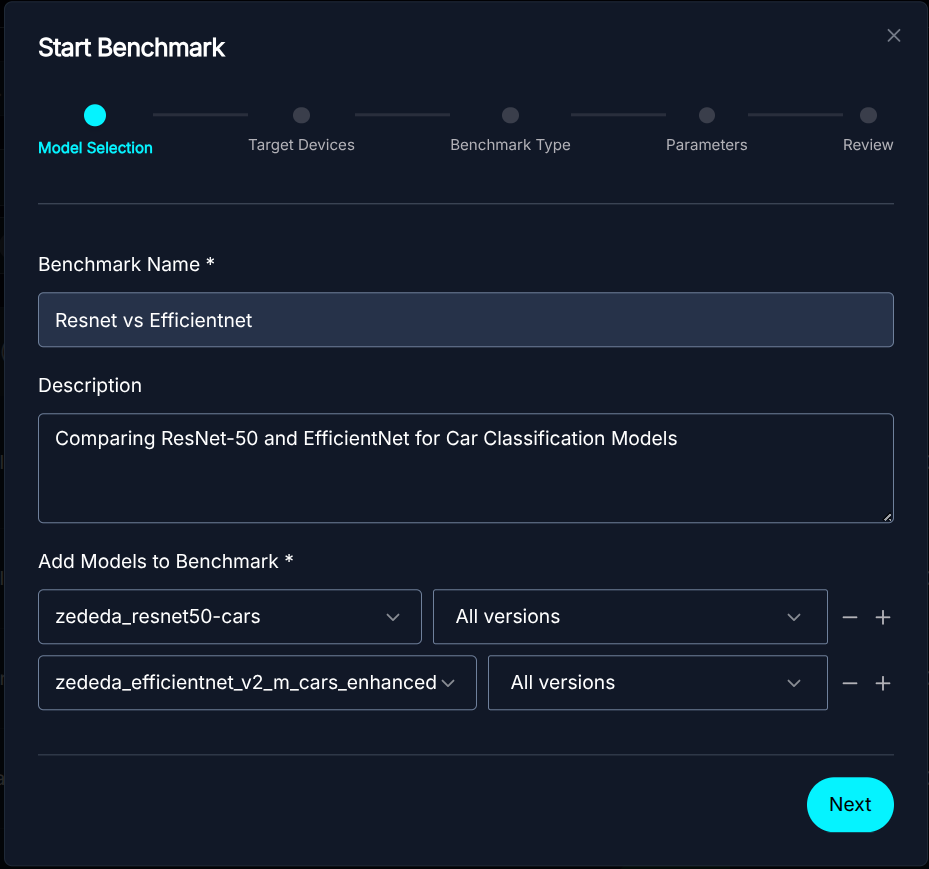 Model Selection
 - Select the Hardware: Choose a set of target platforms from our diverse device pool. We currently support a range of platforms, including Intel NUCs with Arc iGPUs and NVIDIA Jetson, and expect to grow this in the future.
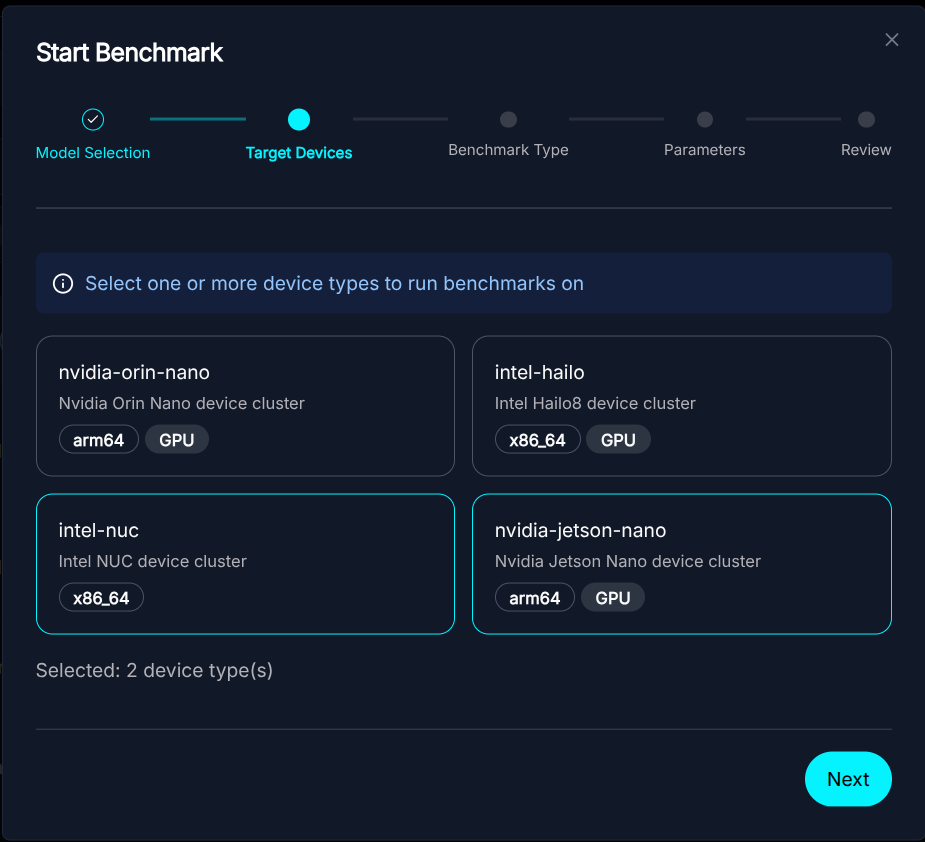 Device Pool Selection
 - Select the Test: Select the specific benchmark test you want to run. ZEDEDA is continuously adding new benchmark tests for you to run with your model.
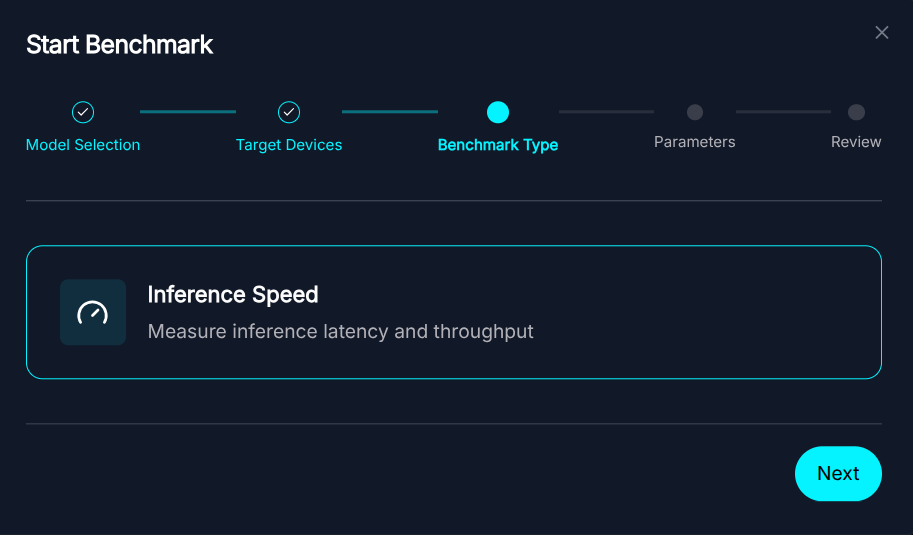 Select the Benchmark Test type
 - Configure Test Parameters: Customize benchmark settings, including duration, warmup iterations, batch size, and concurrency to tailor the test to your requirements.
 Benchmark Parameter Configuration
 - Run the Job:ZEDEDA orchestrates the deployment and monitors the parameters.
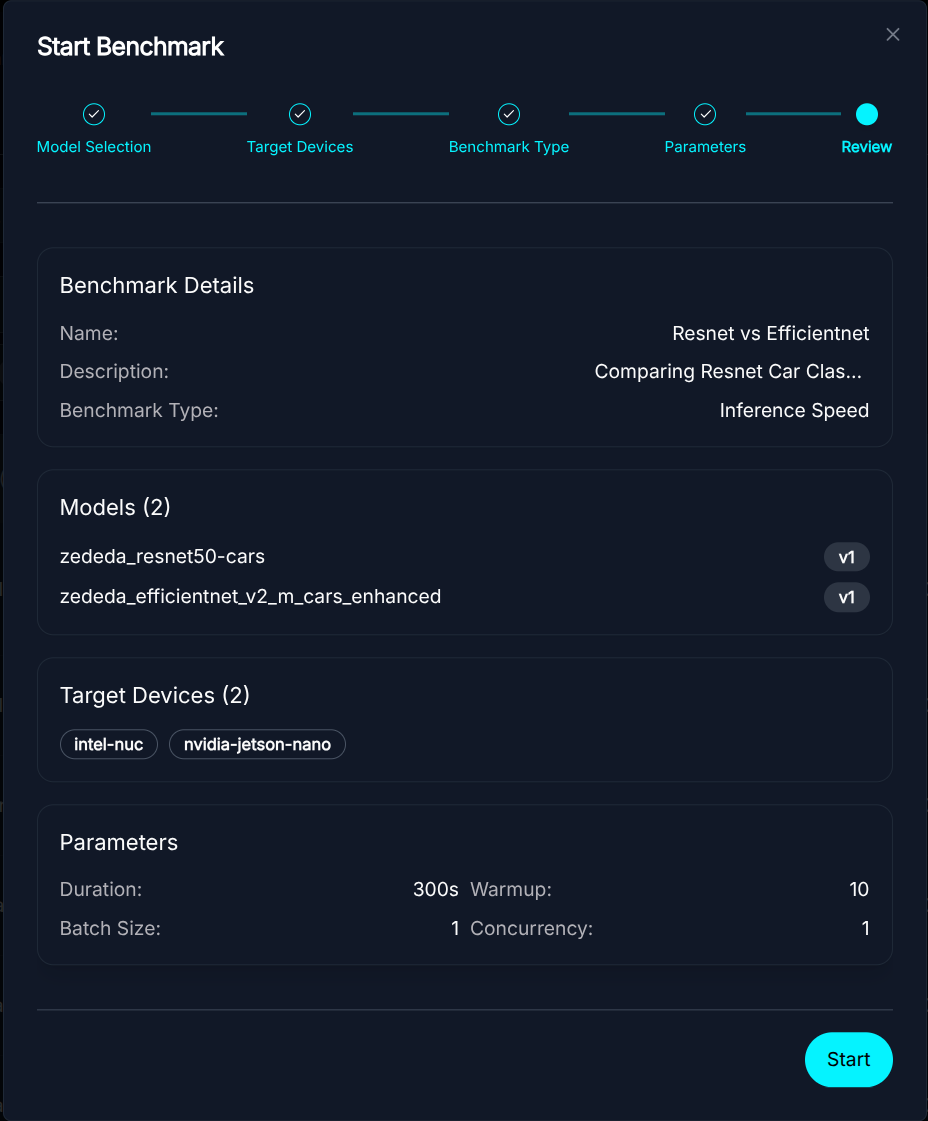 Start Benchmark
Metrics Collection and Methodology
For our benchmarking suite, we capture a comprehensive set of metrics to evaluate not only raw performance but also system efficiency and stability.
For our benchmarking suite, we capture a comprehensive set of metrics to evaluate not only raw performance but also system efficiency and stability.
-
- Performance Metrics:
- Latency (ms): We track the p50, p95, and p99 percentiles to assess response-time consistency.
- Throughput (FPS): The total inferences processed per second.
- Error Rate: The percentage of failed inference requests.
- Performance Metrics:
- System & Environmental Metrics:
- Resource Utilization: CPU and Memory usage, along with GPU Utilization and GPU Memory footprint.
- Power Consumption (Watts): Real-time power draw of the system or specific components.
- Thermals (°C): Operating temperatures of the CPU and GPU to detect thermal throttling.
How We Collect Data (Standard Toolkits):
We utilize industry-standard toolkits to ensure accuracy and broad hardware support.
- NVIDIA GPUs: We use nvidia-smi to query the GPU’s internal sensors for precise power draw, temperature, and utilization stats.
- NVIDIA Jetson Devices: We integrate with tegrastats, the standard utility for Jetson, to monitor specific power rails (VDD) and thermal zones.
- Intel & x86 CPUs: We employ RAPL (Running Average Power Limit) interfaces and the turbostat utility to access hardware counters for accurate CPU package power estimation.
- General Hardware: As a fallback, we interface with standard Linux subsystems like lm-sensors, /sys/class/thermal, and power_supply to gather telemetry from a wide range of edge devices.
Visualizing the Trade-offs
Once the benchmark is complete, you get a detailed dashboard showing exactly how the model performed.
The Overview section details the high-level performance metrics for the models and devices tested. In this benchmark, we compare two car classification models, ResNet-50 and EfficientNet, across two representative edge devices:
- NVIDIA Jetson Nano: An AI-optimized platform featuring a 6-core ARM CPU, Tegra GPU, and 7.4GB of RAM.
- Intel NUC: A general-purpose x86 compute platform featuring a 2-core CPU and 30.8GB of RAM.
The interplay between model architecture and device capabilities is crucial for real-world performance. This comparison demonstrates the inherent trade-offs, particularly those between utilizing specialized accelerators and standard CPUs.
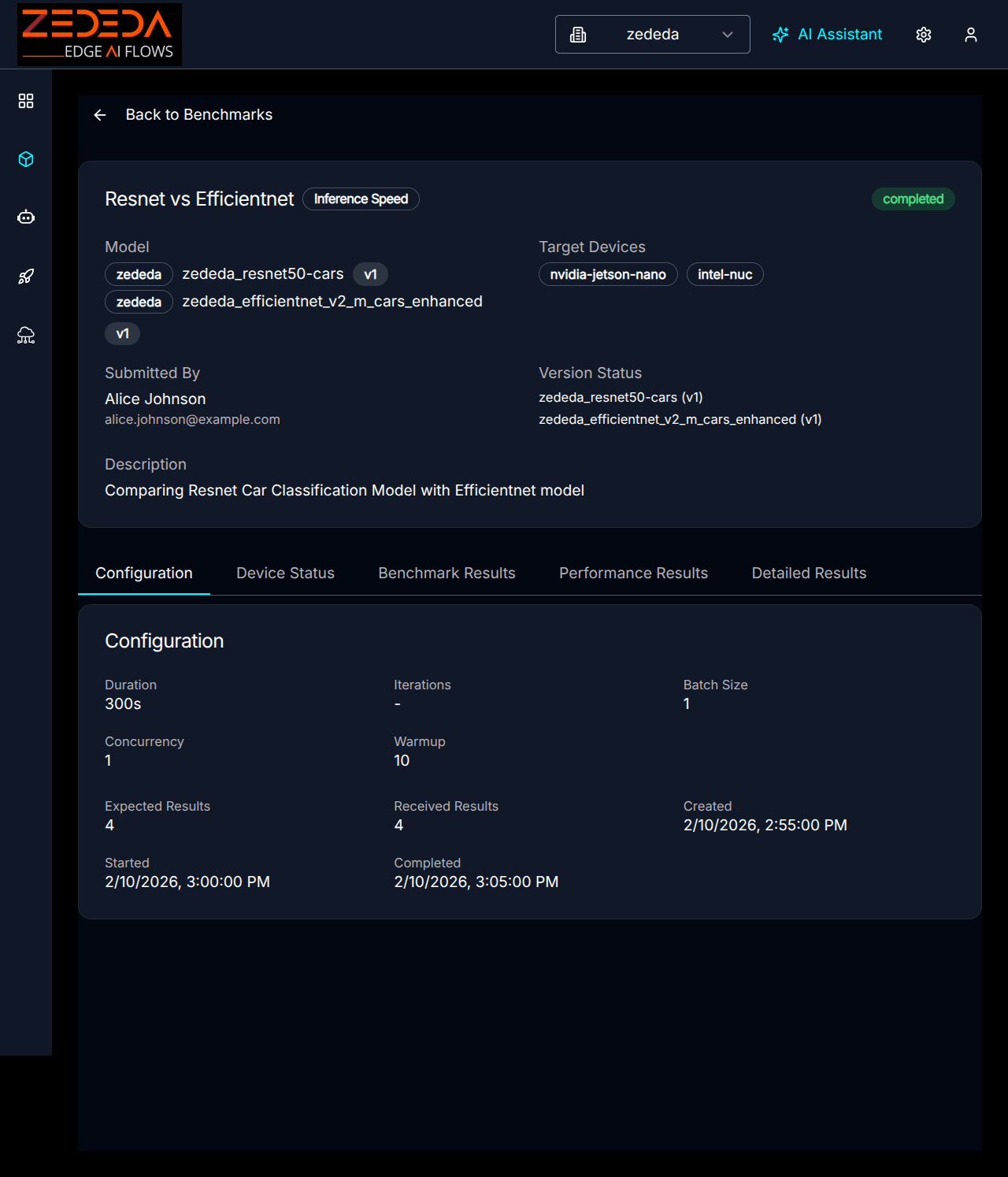 Benchmark Configuration
 Benchmark Device Status
Benchmark results provide a side-by-side comparison of practical operational metrics (throughput, latency, power, thermals, etc.) for AI models across the benchmarking edge hardware platforms
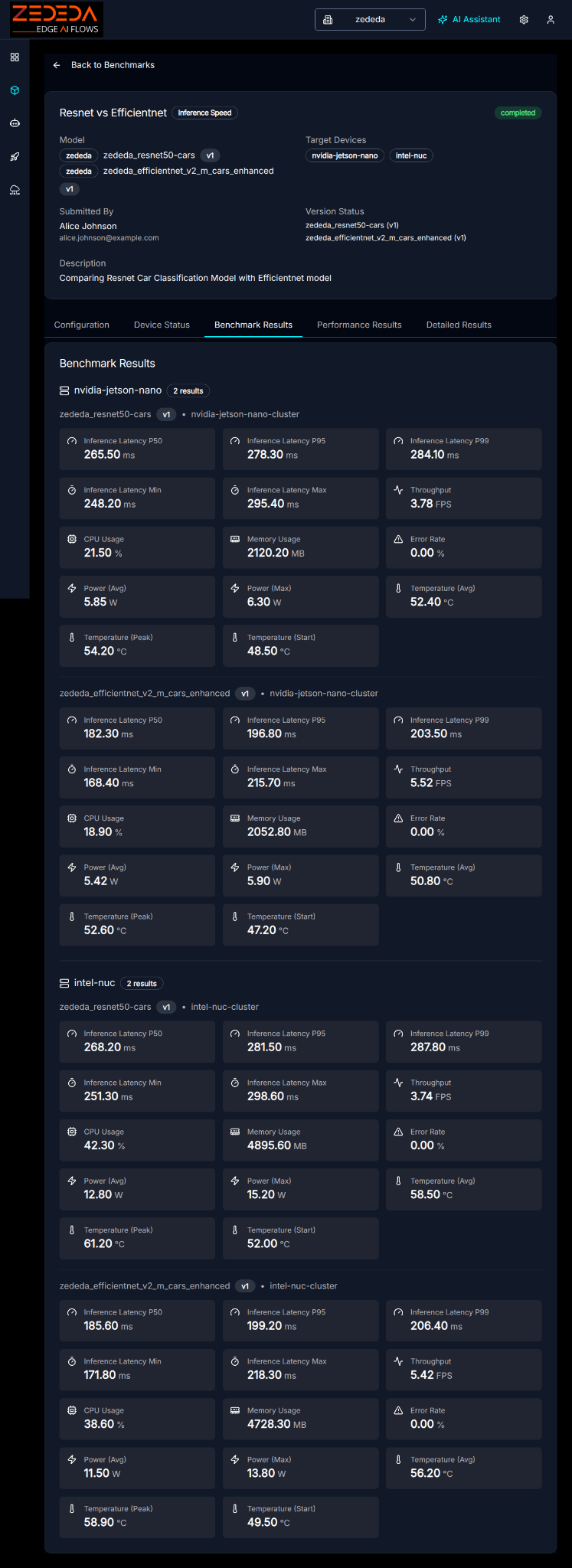 Benchmark Results
The key metrics are summarized in the accompanying Summary Charts:
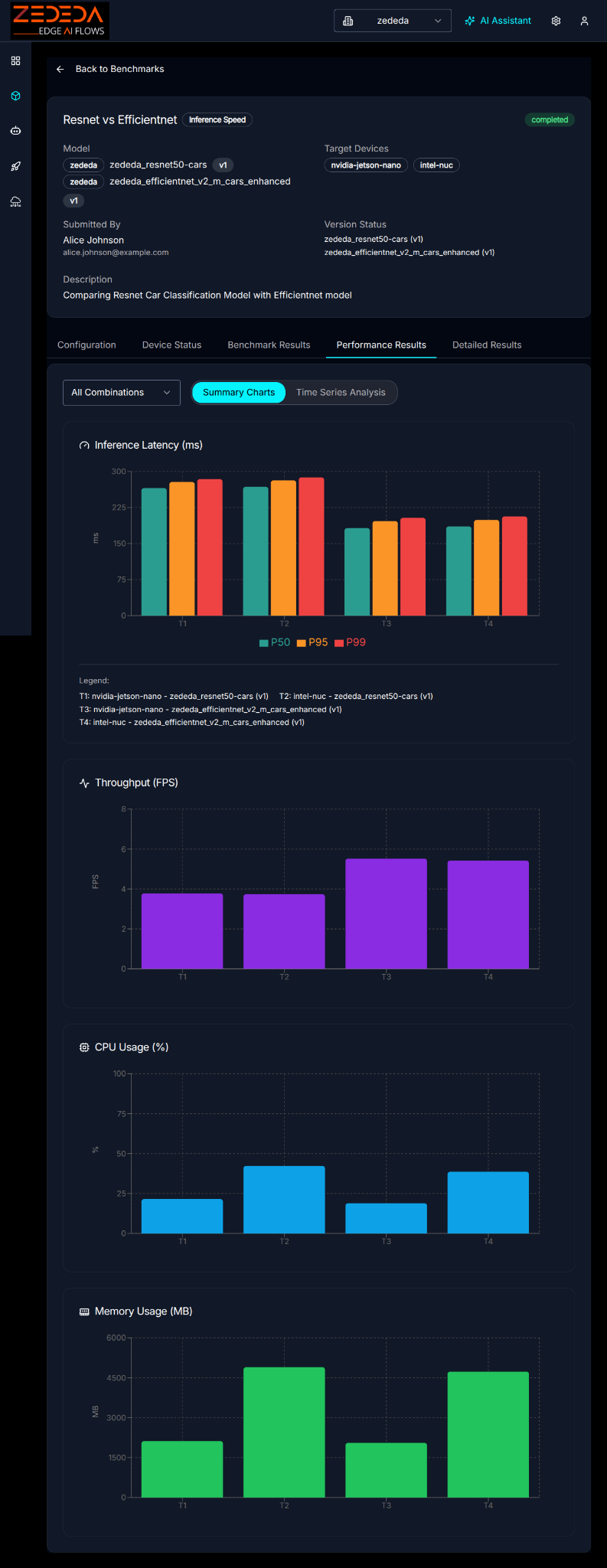 Summary Charts
Time series data can be used to track the stability of the model’s performance:
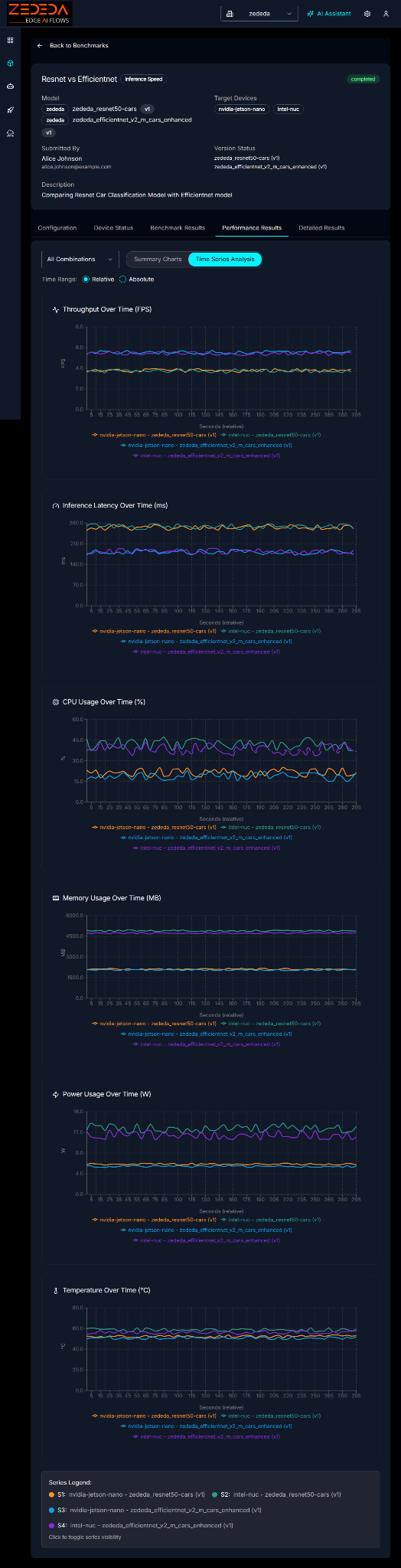 Time Series Analysis of FPS, Latency, CPU Usage, Memory, Power Usage, Temperature
The results provide a comprehensive view, detailing all the data points:
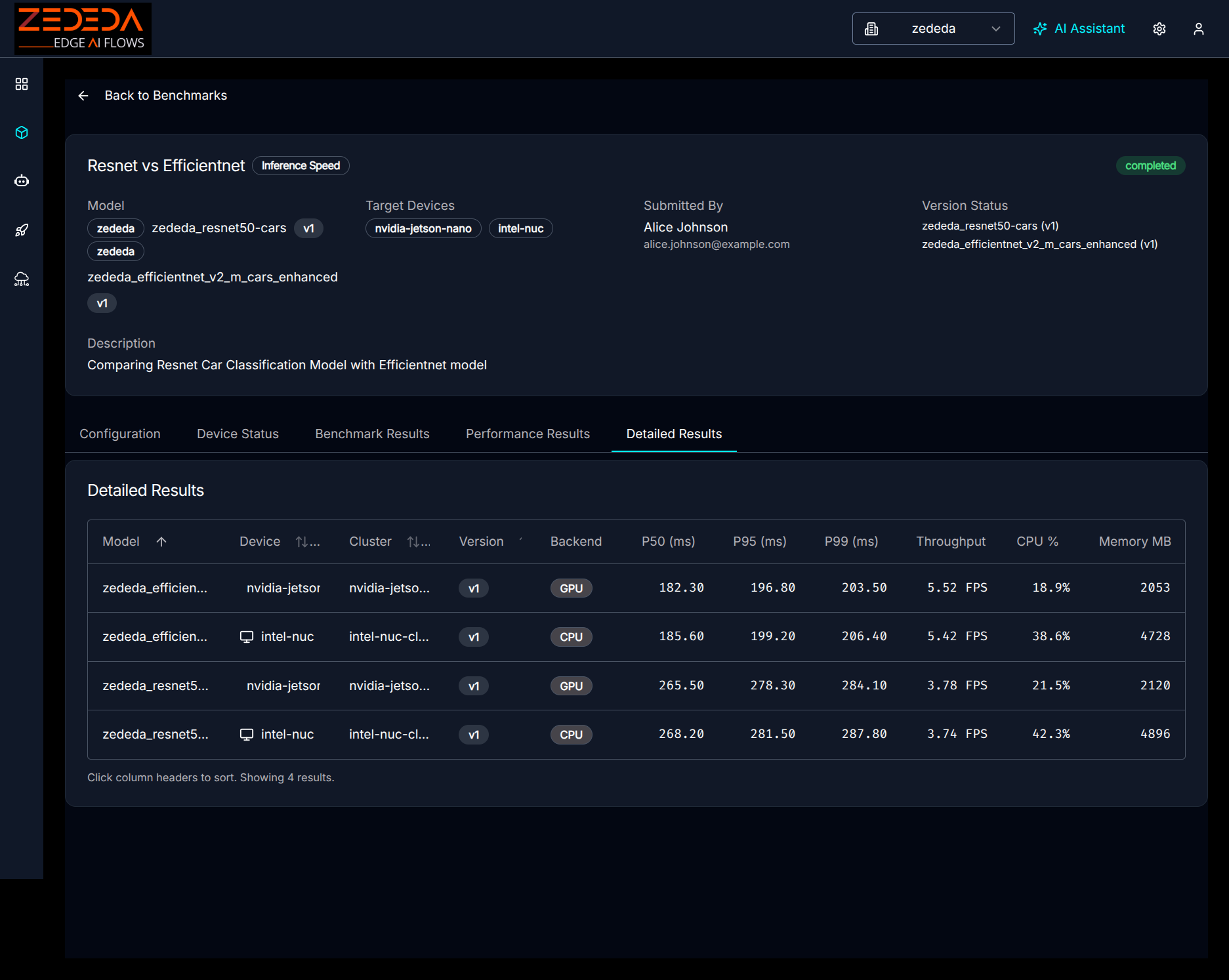 Detailed Results
This data empowers you to make informed decisions.
- Model A offers higher accuracy but causes the device to reach its thermal limit after 20 minutes. In contrast, Model B maintains consistent performance at lower temperatures, offering a choice between peak precision and long-term stability.
- You might observe that a quantized LLM runs at double the generation speed and produces 30% less heat than its full-precision counterpart, providing concrete data to weigh the importance of reasoning quality against power budget and thermal headroom.
Next Steps
If you need to evaluate and optimize AI models for edge deployment, ZEDEDA can help. Our Edge Intelligence Platform combines an AI-driven approach to build and orchestrate edge agents, models, applications, and infrastructure. Our platform lets you build, test, and deploy AI agents and models on any edge hardware, using the same edge orchestration platform trusted by the world’s largest enterprises. Get in touch at https://zededa.com/contact-us/.
FAQ
1. What specific performance metrics does the edge AI benchmark measure?
These are the key metrics for edge AI model performance:
- Speed & Efficiency: Throughput (FPS for Vision, Tokens/sec for GenAI) and latency (P50, P95, P99).
- System Usage: Real-time CPU, memory, and GPU utilization.
- Physical Impact: Power consumption (Watts) and Thermal signatures (°C).
GenAI Specifics: We measure Time-to-First-Token (TTFT) and Inter-Token Latency to quantify the user experience.
2. What types of AI models can be benchmarked with ZEDEDA?
The framework supports a dual set of workloads:
- Computer Vision: Traditional models like Object Detection and Classification (e.g., YOLO, ResNet, EfficientNet) using standard formats like .onnx, .ir, .plan, .engine, and .model. We are actively working to add more model frameworks.
- Generative AI: Large Language Models (LLMs) and Vision-Language Models (VLMs) using industry-standard format GGUF, allowing you to test modern quantized models suitable for the edge.
3. Which edge AI hardware platforms are currently supported for benchmarking?
We maintain a diverse pool of real hardware in our labs, not simulations. Our lineup currently includes:
- NVIDIA Jetson: AI-optimized platforms, including Jetson Orin Nano and Jetson Orin AGX.
- Intel NUC x86: AI NUC platforms based on Intel Ultra processors, with Arc iGPU.
We are actively working on adding more hardware platforms to the list.
4. Can I compare different versions of the same edge AI model?
Yes. You can select multiple versions of a single model (e.g., v1 float32 vs. v2 int8 quantized), different models, or a combination of both and run them simultaneously on the same target device. This capability allows you to measure the trade-off among accuracy, speed, and power consumption to identify the optimal version for deployment.
5. Do I need to upload large test datasets (images/videos) to run a benchmark?
No. To ensure standardized and reproducible results, our benchmark engine automatically generates synthetic input tensors (noise) matching your model’s expected input shape. This approach measures the raw performance limit of the hardware without the latency overhead of network I/O or disk reading.
6. Can I benchmark my own edge AI models?
Yes. You can bring your own models. The platform supports importing private models, whether they are standard CV models or GGUF-formatted LLMs, into your model registry. Once imported, they are available for selection in the edge AI benchmark wizard alongside public models.
7. Can I automate edge AI benchmarking as part of my CI/CD pipeline?
Yes. ZEDEDA exposes a full Python SDK and CLI. You can programmatically trigger benchmarks via appropriate hooks, such as GitHub Actions, whenever your data science team retrains a model, ensuring that every new version meets your latency and power budget before it reaches a production device.
8. How do you ensure my edge AI benchmark isn’t affected by other users’ tests?
We use a strict locking and queueing system for our physical device pool. When you submit a job, the system allocates a dedicated lab device to your workload for the duration of the test. This isolation ensures that your results reflect the true capabilities of the hardware, unaffected by other workloads.